Sunday, June 7, 2020

COMPUTER SCIENCE SYLLABUS FOR CBSE CLASS 12

. Learning Outcomes 
1. Understand the concept of functions and recursion.
 2. Learn how to create and use Python libraries.
 3. Learn file handling. 
4. Learn about the concept of efficiency in algorithms and computing in general.
 5. Learn basic data structures: lists, stacks, and queues. 
6. Get a basic understanding of computer networks: network stack, basic network hardware, basic protocols, and basic tools. 
7. Connect a Python program with an SQL database, and learn aggregation functions in SQL.
 8. Have a clear understanding of cyber ethics and cybercrime. Understand the value of technology in societies, gender and disability issues, and the technology behind biometric ids.
Unit 1: Programming and Computational Thinking (PCT-2) (80 Theory + 70 Practical) 
 Revision of the basics of Python  Functions: scope, parameter passing, mutable/immutable properties of data objects, pass arrays to functions, return values, functions using libraries: mathematical, and string functions.  File handling: open and close a file, read, write, and append to a file, standard input, output, and error streams, relative and absolute paths.  Using Python libraries: create and import Python libraries  Recursion: simple algorithms with recursion: factorial, Fibonacci numbers; recursion on arrays: binary search  Idea of efficiency: performance defined as inversely proportional to the wall clock time, count the number of operations a piece of code is performing, and measure the time taken by a program. Example: take two different programs for the same problem, and understand how the efficient one takes less time.  Data visualization using Pyplot: line chart, pie chart, and bar chart.  Data-structures: lists, stacks, queues.
Unit 2: Computer Networks (CN)
 Structure of a network: Types of networks: local area and wide area (web and internet), new technologies such as cloud and IoT, public vs. private cloud, wired and wireless networks; concept of a client and server.  Network devices such as a NIC, switch, hub, router, and access point.  Network stack: amplitude and frequency modulation, collision in wireless networks, error checking, and the notion of a MAC address, main idea of routing. IP addresses: (v4 and v6), routing table, router, DNS, and web URLs, TCP: basic idea of retransmission, and rate modulation when there is congestion (analogy to a road network), Protocols: 2G, 3G, 4G, WiFi. What makes a protocol have a higher bandwidth?  Basic network tools: traceroute, ping, ipconfig, nslookup, whois, speed-test.  Application layer: HTTP (basic idea), working of email, secure communication: encryption and certificates (HTTPS), network applications: remote desktop, remote login, HTTP, FTP, SCP, SSH, POP/IMAP, SMTP, VoIP, NFC.  
Unit 3: Data Management (DM-2) (20 Theory + 20 Practical) 
 Write a minimal Django based web application that parses a GET and POST request, and writes the fields to a file - flat file and CSV file.  Interface Python with an SQL database  SQL commands: aggregation functions – having, group by, order by
Unit 4: Society, Law and Ethics (SLE-2) (10 Theory)  Intellectual property rights, plagiarism, digital rights management, and licensing (Creative Commons, GPL and Apache), open source, open data, privacy.  Privacy laws, fraud; cyber-crime- phishing, illegal downloads, child pornography, scams; cyber forensics, IT Act, 2000.  Technology and society: understanding of societal issues and cultural changes induced by technology.  E-waste management: proper disposal of used electronic gadgets.  Identity theft, unique ids, and biometrics.  Gender and disability issues while teaching and using computers. 

COMPUTER SCIENCE SYLLABUS FOR CBSE CLASS 11

 Learning Outcomes 1. Develop basic computational thinking. Learn how to reason with variables, state transitions, conditionals, and iteration. 2. Understand the notion of data types, and higher order data structures such as lists, tuples, and dictionaries. 3. Appreciate the notion of an algorithm, and understand its structure, including how algorithms handle corner cases. 4. Develop a basic understanding of computer systems - architecture, OS, mobile and cloud computing. 5. Learn basic SQL programming. 6. Learn all about cyber safety.
Unit 1: Programming and Computational Thinking (PCT-1) (80 Theory + 70 Practical)  Familiarization with the basics of Python programming: a simple “hello world" program, process of writing a program, running it, and print statements; simple data-types: integer, float, string  Introduce the notion of a variable, and methods to manipulate it (concept of L-value and Rvalue even if not taught explicitly)  Knowledge of data types and operators: accepting input from the console, assignment statement, expressions, operators and their precedence.  Conditional statements: if, if-else, if-elif-else; simple programs: e.g.: absolute value, sort 3 numbers, and divisibility.  Notion of iterative computation and control flow: for, while, flowcharts, decision trees and pseudo code; write a lot of programs: interest calculation, primarily testing, and factorials.  Idea of debugging: errors and exceptions; debugging: pdb, break points.  Lists, tuples and dictionary: finding the maximum, minimum, mean; linear search on list/tuple of numbers, and counting the frequency of elements in a list using a dictionary. Introduce the notion of accessing elements in a collection using numbers and names.  Sorting algorithm: bubble and insertion sort; count the number of operations while sorting.  Strings: compare, concat, substring; notion of states and transitions using state transition diagrams
. Unit 2: Computer Systems and Organisation (CSO) (20 Theory + 6 Practical)  Basic computer organisation: description of a computer system and mobile system, CPU, memory, hard disk, I/O, battery, power.  Types of software: application, OS, utility, libraries.  Language of Bits: bit, byte, MB, GB, TB, and PB.  Boolean logic: OR, AND, NAND, NOR, XOR, NOT, truth tables, De Morgan’s laws  Information representation: numbers in base 2, 8, 16, unsigned integers, binary addition  Strings: ASCII, UTF8, UTF32, ISCII (Indian script code)  Execution of a program: basic flow of compilation – program  binary  execution  Interpreters (process one line at a time), difference between a compiler and an interpreter  Running a program: Notion of an operating system, how an operating system runs a program, idea of loading, operating system as a resource manager.  Concept of cloud computers, cloud storage (public/private), and brief introduction to parallel computing.
Unit 3: Data Management (DM-1) (30 Theory+ 24 Practical)  Relational databases: idea of a database and the need for it, relations, keys, primary key, foreign key; use SQL commands to create a table, keys, foreign keys; insert/delete an entry, delete a table.  SQL commands: select, project, and join; indexes, and a lot of in-class practice.  Basics of NoSQL databases - Mongo DB.

Unit 4: Society, Law and Ethics (SLE-1) - Cyber safety (10 Theory)  Cyber safety: safely browsing the web, identity protection, confidentiality, social networks, cyber trolls and bullying  Appropriate usage of social networks: spread of rumours, and common social networking sites (Twitter, LinkedIn, and Facebook) and specific usage rules.  Safely accessing web sites: adware, malware, viruses, Trojans  Safely communicating data: secure connections, eavesdropping, phishing and identity verification 

Python Namespace and Scope

What is Name in Python?

If you have ever read 'The Zen of Python' (type import this in the Python interpreter), the last line states, Namespaces are one honking great idea -- let's do more of those! So what are these mysterious namespaces? Let us first look at what name is.
Name (also called identifier) is simply a name given to objects. Everything in Python is an object. Name is a way to access the underlying object.
For example, when we do the assignment a = 2, 2 is an object stored in memory and a is the name we associate it with. We can get the address (in RAM) of some object through the built-in function id(). Let's look at how to use it.
# Note: You may get different values for the id

a = 2
print('id(2) =', id(2))

print('id(a) =', id(a))
Output
id(2) = 9302208
id(a) = 9302208
Here, both refer to the same object 2, so they have the same id(). Let's make things a little more interesting.
# Note: You may get different values for the id

a = 2
print('id(a) =', id(a))

a = a+1
print('id(a) =', id(a))

print('id(3) =', id(3))

b = 2
print('id(b) =', id(b))
print('id(2) =', id(2))
Output
id(a) = 9302208
id(a) = 9302240
id(3) = 9302240
id(b) = 9302208
id(2) = 9302208
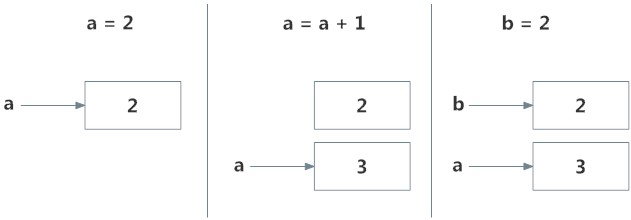
What is happening in the above sequence of steps? Let's use a diagram to explain this:

Memory diagram of a variable
Memory diagram of variables in Python

Initially, an object 2 is created and the name a is associated with it, when we do a = a+1, a new object 3 is created and now a is associated with this object.
Note that id(a) and id(3) have the same values.
Furthermore, when b = 2 is executed, the new name b gets associated with the previous object 2.
This is efficient as Python does not have to create a new duplicate object. This dynamic nature of name binding makes Python powerful; a name could refer to any type of object.
>>> a = 5
>>> a = 'Hello World!'
>>> a = [1,2,3]
All these are valid and a will refer to three different types of objects in different instances. Functions are objects too, so a name can refer to them as well.
def printHello():
    print("Hello")


a = printHello

a()
Output
Hello
The same name a can refer to a function and we can call the function using this name.

What is a Namespace in Python?

Now that we understand what names are, we can move on to the concept of namespaces.
To simply put it, a namespace is a collection of names.
In Python, you can imagine a namespace as a mapping of every name you have defined to corresponding objects.
Different namespaces can co-exist at a given time but are completely isolated.
A namespace containing all the built-in names is created when we start the Python interpreter and exists as long as the interpreter runs.
This is the reason that built-in functions like id(), print() etc. are always available to us from any part of the program. Each module creates its own global namespace.
These different namespaces are isolated. Hence, the same name that may exist in different modules do not collide.
Modules can have various functions and classes. A local namespace is created when a function is called, which has all the names defined in it. Similar, is the case with class. Following diagram may help to clarify this concept.

Python Operators

What are operators in python?

Operators are special symbols in Python that carry out arithmetic or logical computation. The value that the operator operates on is called the operand.
For example:
>>> 2+3
5
Here, + is the operator that performs addition. 2 and 3 are the operands and 5 is the output of the operation.

Arithmetic operators

Arithmetic operators are used to perform mathematical operations like addition, subtraction, multiplication, etc.
OperatorMeaningExample
+Add two operands or unary plusx + y+ 2
-Subtract right operand from the left or unary minusx - y- 2
*Multiply two operandsx * y
/Divide left operand by the right one (always results into float)x / y
%Modulus - remainder of the division of left operand by the rightx % y (remainder of x/y)
//Floor division - division that results into whole number adjusted to the left in the number linex // y
**Exponent - left operand raised to the power of rightx**y (x to the power y)

Example 1: Arithmetic operators in Python

x = 15
y = 4

# Output: x + y = 19
print('x + y =',x+y)

# Output: x - y = 11
print('x - y =',x-y)

# Output: x * y = 60
print('x * y =',x*y)

# Output: x / y = 3.75
print('x / y =',x/y)

# Output: x // y = 3
print('x // y =',x//y)

# Output: x ** y = 50625
print('x ** y =',x**y)
Output
x + y = 19
x - y = 11
x * y = 60
x / y = 3.75
x // y = 3
x ** y = 50625

Comparison operators

Comparison operators are used to compare values. It returns either True or False according to the condition.
OperatorMeaningExample
>Greater than - True if left operand is greater than the rightx > y
<Less than - True if left operand is less than the rightx < y
==Equal to - True if both operands are equalx == y
!=Not equal to - True if operands are not equalx != y
>=Greater than or equal to - True if left operand is greater than or equal to the rightx >= y
<=Less than or equal to - True if left operand is less than or equal to the rightx <= y

Example 2: Comparison operators in Python

x = 10
y = 12

# Output: x > y is False
print('x > y is',x>y)

# Output: x < y is True
print('x < y is',x<y)

# Output: x == y is False
print('x == y is',x==y)

# Output: x != y is True
print('x != y is',x!=y)

# Output: x >= y is False
print('x >= y is',x>=y)

# Output: x <= y is True
print('x <= y is',x<=y)
Output
x > y is False
x < y is True
x == y is False
x != y is True
x >= y is False
x <= y is True

Logical operators

Logical operators are the and, or, not operators.
OperatorMeaningExample
andTrue if both the operands are truex and y
orTrue if either of the operands is truex or y
notTrue if operand is false (complements the operand)not x

Example 3: Logical Operators in Python

x = True
y = False

print('x and y is',x and y)

print('x or y is',x or y)

print('not x is',not x)
Output
x and y is False
x or y is True
not x is False
Here is the truth table for these operators.

Bitwise operators

Bitwise operators act on operands as if they were strings of binary digits. They operate bit by bit, hence the name.
For example, 2 is 10 in binary and 7 is 111.
In the table below: Let x = 10 (0000 1010 in binary) and y = 4 (0000 0100 in binary)
OperatorMeaningExample
&Bitwise ANDx & y = 0 (0000 0000)
|Bitwise ORx | y = 14 (0000 1110)
~Bitwise NOT~x = -11 (1111 0101)
^Bitwise XORx ^ y = 14 (0000 1110)
>>Bitwise right shiftx >> 2 = 2 (0000 0010)
<<Bitwise left shiftx << 2 = 40 (0010 1000)

Assignment operators

Assignment operators are used in Python to assign values to variables.
a = 5 is a simple assignment operator that assigns the value 5 on the right to the variable a on the left.
There are various compound operators in Python like a += 5 that adds to the variable and later assigns the same. It is equivalent to a = a + 5.
OperatorExampleEquivalent to
=x = 5x = 5
+=x += 5x = x + 5
-=x -= 5x = x - 5
*=x *= 5x = x * 5
/=x /= 5x = x / 5
%=x %= 5x = x % 5
//=x //= 5x = x // 5
**=x **= 5x = x ** 5
&=x &= 5x = x & 5
|=x |= 5x = x | 5
^=x ^= 5x = x ^ 5
>>=x >>= 5x = x >> 5
<<=x <<= 5x = x << 5

Special operators

Python language offers some special types of operators like the identity operator or the membership operator. They are described below with examples.

Identity operators

is and is not are the identity operators in Python. They are used to check if two values (or variables) are located on the same part of the memory. Two variables that are equal does not imply that they are identical.
OperatorMeaningExample
isTrue if the operands are identical (refer to the same object)x is True
is notTrue if the operands are not identical (do not refer to the same object)x is not True

Example 4: Identity operators in Python

x1 = 5
y1 = 5
x2 = 'Hello'
y2 = 'Hello'
x3 = [1,2,3]
y3 = [1,2,3]

# Output: False
print(x1 is not y1)

# Output: True
print(x2 is y2)

# Output: False
print(x3 is y3)
Output
False
True
False
Here, we see that x1 and y1 are integers of the same values, so they are equal as well as identical. Same is the case with x2 and y2 (strings).
But x3 and y3 are lists. They are equal but not identical. It is because the interpreter locates them separately in memory although they are equal.

Membership operators

in and not in are the membership operators in Python. They are used to test whether a value or variable is found in a sequence (string, list, tuple, set and dictionary).
In a dictionary we can only test for presence of key, not the value.
OperatorMeaningExample
inTrue if value/variable is found in the sequence5 in x
not inTrue if value/variable is not found in the sequence5 not in x

Example #5: Membership operators in Python

x = 'Hello world'
y = {1:'a',2:'b'}

# Output: True
print('H' in x)

# Output: True
print('hello' not in x)

# Output: True
print(1 in y)

# Output: False
print('a' in y)
Output
True
True
True
False
Here, 'H' is in x but 'hello' is not present in x (remember, Python is case sensitive). Similarly, 1 is key and 'a' is the value in dictionary y. Hence, 'a' in y
returns False.