Monday, June 22, 2020

Python Recursion

What is recursion?

Recursion is the process of defining something in terms of itself.

A physical world example would be to place two parallel mirrors facing each other. Any object in between them would be reflected recursively.

Python Recursive Function

In Python, we know that a function can call other functions. It is even possible for the function to call itself. These types of construct are termed as recursive functions.

The following image shows the working of a recursive function called recurse.
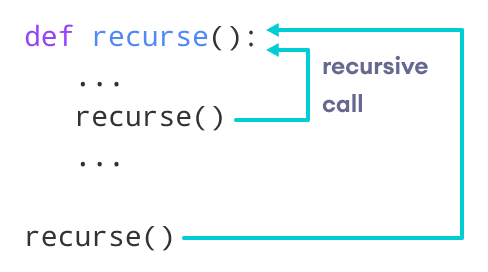
Python Recursive Function
Recursive Function in Python

Following is an example of a recursive function to find the factorial of an integer.

Factorial of a number is the product of all the integers from 1 to that number. For example, the factorial of 6 (denoted as 6!) is 1*2*3*4*5*6 = 720.

Example of a recursive function

def factorial(x):
    """This is a recursive function
    to find the factorial of an integer"""

    if x == 1:
        return 1
    else:
        return (x * factorial(x-1))


num = 3
print("The factorial of", num, "is", factorial(num))

Output

The factorial of 3 is 6

In the above example, factorial() is a recursive function as it calls itself.

When we call this function with a positive integer, it will recursively call itself by decreasing the number.

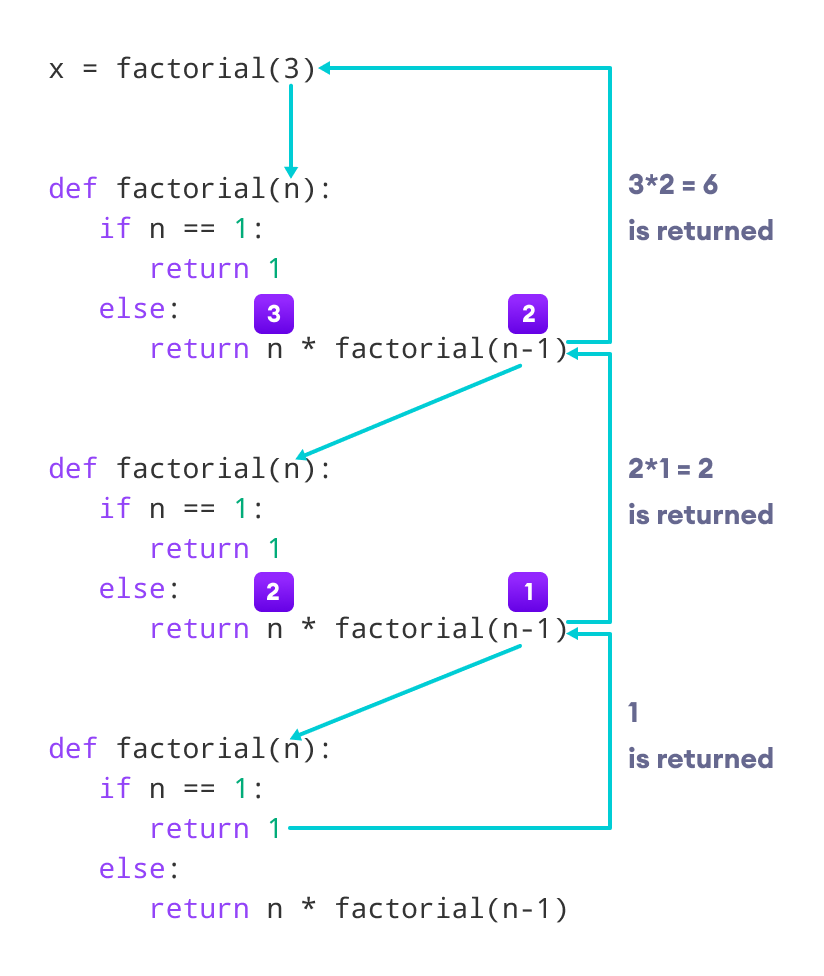
Each function multiplies the number with the factorial of the number below it until it is equal to one. This recursive call can be explained in the following steps.

factorial(3)          # 1st call with 3
3 * factorial(2)      # 2nd call with 2
3 * 2 * factorial(1)  # 3rd call with 1
3 * 2 * 1             # return from 3rd call as number=1
3 * 2                 # return from 2nd call
6                     # return from 1st call

Let's look at an image that shows a step-by-step process of what is going on:

Factorial by a recursive method
Working of a recursive factorial function

Our recursion ends when the number reduces to 1. This is called the base condition.

Every recursive function must have a base condition that stops the recursion or else the function calls itself infinitely.

The Python interpreter limits the depths of recursion to help avoid infinite recursions, resulting in stack overflows.

By default, the maximum depth of recursion is 1000. If the limit is crossed, it results in RecursionError. Let's look at one such condition.

def recursor():
    recursor()
recursor()


Disadvantages of Recursion

  1. Sometimes the logic behind recursion is hard to follow through.
  2. Recursive calls are expensive (inefficient) as they take up a lot of memory and time.
  3. Recursive functions are hard to debug.
  4. Output

    Traceback (most recent call last):
      File "<string>", line 3, in <module>
      File "<string>", line 2, in a
      File "<string>", line 2, in a
      File "<string>", line 2, in a
      [Previous line repeated 996 more times]
    RecursionError: maximum recursion depth exceeded

    Advantages of Recursion

    1. Recursive functions make the code look clean and elegant.
    2. A complex task can be broken down into simpler sub-problems using recursion.
    3. Sequence generation is easier with recursion than using some nested iteration.


Python Function Arguments

In Python, you can define a function that takes variable number of arguments. In this article, you will learn to define such functions using default, keyword and arbitrary arguments.

Arguments

In the user-defined function topic, we learned about defining a function and calling it. Otherwise, the function call will result in an error. Here is an example.

def greet(name, msg):
    """This function greets to
    the person with the provided message"""
    print("Hello", name + ', ' + msg)

greet("Monica", "Good morning!")

Output

Hello Monica, Good morning!

Here, the function greet() has two parameters.

Since we have called this function with two arguments, it runs smoothly and we do not get any error.

If we call it with a different number of arguments, the interpreter will show an error message. Below is a call to this function with one and no arguments along with their respective error messages.

>>> greet("Monica")    # only one argument
TypeError: greet() missing 1 required positional argument: 'msg'
>>> greet()    # no arguments
TypeError: greet() missing 2 required positional arguments: 'name' and 'msg'

Variable Function Arguments

Up until now, functions had a fixed number of arguments. In Python, there are other ways to define a function that can take variable number of arguments.

Three different forms of this type are described below.

Python Default Arguments

Function arguments can have default values in Python.

We can provide a default value to an argument by using the assignment operator (=). Here is an example.

def greet(name, msg="Good morning!"):
    """
    This function greets to
    the person with the
    provided message.

    If the message is not provided,
    it defaults to "Good
    morning!"
    """

    print("Hello", name + ', ' + msg)


greet("Kate")
greet("Bruce", "How do you do?")

Output

Hello Kate, Good morning!
Hello Bruce, How do you doIn this function, the parameter name 
does not have a default value and is required (mandatory) during a call.

On the other hand, the parameter msg has a default value of "Good morning!". So, it is optional during a call. If a value is provided, it will overwrite the default value.

Any number of arguments in a function can have a default value. But once we have a default argument, all the arguments to its right must also have default values.

This means to say, non-default arguments cannot follow default arguments. For example, if we had defined the function header above as:

def greet(msg = "Good morning!", name):

We would get an error as:

SyntaxError: non-default argument follows default argument

Python Keyword Arguments

When we call a function with some values, these values get assigned to the arguments according to their position.

For example, in the above function greet(), when we called it as greet("Bruce", "How do you do?"), the value "Bruce" gets assigned to the argument name and similarly "How do you do?" to msg.

Python allows functions to be called using keyword arguments. When we call functions in this way, the order (position) of the arguments can be changed. Following calls to the above function are all valid and produce the same result.

# 2 keyword arguments
greet(name = "Bruce",msg = "How do you do?")

# 2 keyword arguments (out of order)
greet(msg = "How do you do?",name = "Bruce") 

1 positional, 1 keyword argument
greet("Bruce", msg = "How do you do?")           

As we can see, we can mix positional arguments with keyword arguments during a function call. But we must keep in mind that keyword arguments must follow positional arguments.

Having a positional argument after keyword arguments will result in errors. For example, the function call as follows:

greet(name="Bruce","How do you do?")

Will result in an error:

SyntaxError: non-keyword arg after keyword arg

Python Arbitrary Arguments

Sometimes, we do not know in advance the number of arguments that will be passed into a function. Python allows us to handle this kind of situation through function calls with an arbitrary number of arguments.

In the function definition, we use an asterisk (*) before the parameter name to denote this kind of argument. Here is an example.

def greet(*names):
    """This function greets all
    the person in the names tuple."""

    # names is a tuple with arguments
    for name in names:
        print("Hello", name)


greet("Monica", "Luke", "Steve", "John")
Hello Monica
Hello Luke
Hello Steve
Hello John

Here, we have called the function with multiple arguments. These arguments get wrapped up into a tuple before being passed into the function. Inside the function, we use a for loop to retrieve all the arguments back.

Scope and Lifetime of variables

Scope and Lifetime of variables

Scope of a variable is the portion of a program where the variable is recognized. Parameters and variables defined inside a function are not visible from outside the function. Hence, they have a local scope.

The lifetime of a variable is the period throughout which the variable exits in the memory. The lifetime of variables inside a function is as long as the function executes.

They are destroyed once we return from the function. Hence, a function does not remember the value of a variable from its previous calls.

Here is an example to illustrate the scope of a variable inside a function.

def my_func():
	x = 10
	print("Value inside function:",x)

x = 20
my_func()
print("Value outside function:",x)

Output

Value inside function: 10
Value outside function: 20

Here, we can see that the value of x is 20 initially. Even though the function my_func() changed the value of x to 10, it did not affect the value outside the function.

This is because the variable x inside the function is different (local to the function) from the one outside. Although they have the same names, they are two different variables with different scopes.

On the other hand, variables outside of the function are visible from inside. They have a global scope.

We can read these values from inside the function but cannot change (write) them. In order to modify the value of variables outside the function, they must be declared as global variables using the keyword global.


Python Functions

What is a function in Python?

In Python, a function is a group of related statements that performs a specific task.

Functions help break our program into smaller and modular chunks. As our program grows larger and larger, functions make it more organized and manageable.

Furthermore, it avoids repetition and makes the code reusable.

Syntax of Function

def function_name(parameters):
	"""docstring"""
	statement(s)

Above shown is a function definition that consists of the following components.

  1. Keyword def that marks the start of the function header.
  2. A function name to uniquely identify the function. Function naming follows the same rules of writing identifiers in Python.
  3. Parameters (arguments) through which we pass values to a function. They are optional.
  4. A colon (:) to mark the end of the function header.
  5. Optional documentation string (docstring) to describe what the function does.
  6. One or more valid python statements that make up the function body. Statements must have the same indentation level (usually 4 spaces).
  7. An optional return statement to return a value from the function.

Example of a function

def greet(name):
    """
    This function greets to
    the person passed in as
    a parameter
    """
    print("Hello, " + name + ". Good morning!")

How to call a function in python?

Once we have defined a function, we can call it from another function, program or even the Python prompt. To call a function we simply type the function name with appropriate parameters.

>>> greet('Paul')
Hello, Paul. Good morning!

Note: Try running the above code in the Python program with the function definition to see the output.

def greet(name):
    """
    This function greets to
    the person passed in as
    a parameter
    """
    print("Hello, " + name + ". Good morning!")

greet('Paul')